Support
A help section — availability, channels, topics, requests and the furniture around a support thread.
Installation
Support ships with the library — install it once, then import:
import { Support } from "@delacour/react-native-ui/support";Or copy the source into your project, to own and edit it:
bunx delacour@latest add supportUsage
import { Icon } from "@/components/ui/icon";
import { Support } from "@/components/ui/support";
import { IconBubbleText, IconEmail1 } from "@/lib/icons/central";
import { Linking, ScrollView } from "react-native";

const openChat = () => {};
const openEmail = () => Linking.openURL("mailto:help@example.com");

export default function Example() {
  return (
    <ScrollView contentContainerClassName="p-4">
      <Support availability="online">
        <Support.Header title="Help" description="Questions about an order or your account." />
        <Support.Status replyTime="Typically replies in under an hour" />
        <Support.Channels title="Get in touch">
          <Support.Channel icon={<Icon icon={IconBubbleText} />} label="Chat" detail="~5m" onPress={openChat} />
          <Support.Channel icon={<Icon icon={IconEmail1} />} label="Email" detail="~1d" onPress={openEmail} />
        </Support.Channels>
        <Support.Conversations title="Your requests">
          <Support.Conversation title="Refund for order #4821" status="solved" timestamp="2h" unread />
        </Support.Conversations>
      </Support>
    </ScrollView>
  );
}
Composition
Support                     availability, once
├── Support.Header          title, description, trailing faces
├── Support.Status          the dot and the line
├── Support.Channels        → Support.Channel …
├── Support.Topics          → Support.Topic …      (radio group)
├── Support.Conversations   → Support.Conversation …
├── Support.Articles        → Support.Article …
│
│   on the thread route — no root needed
├── Support.Agent           face, name, status or typing
├── Support.Ticket          the request this thread belongs to
├── Support.Handoff         between two turns
├── Support.Replies         → Support.Reply …
├── Support.Note            above the composer
└── Support.Resolution      the closing question, your control
Every part is optional. No help centre, leave out Articles; one queue, leave out Topics.
The ways in
A Support.Channel is a row with an icon, what it is, and what it costs in waiting. The app opens
it in onPress — Support never calls Linking.
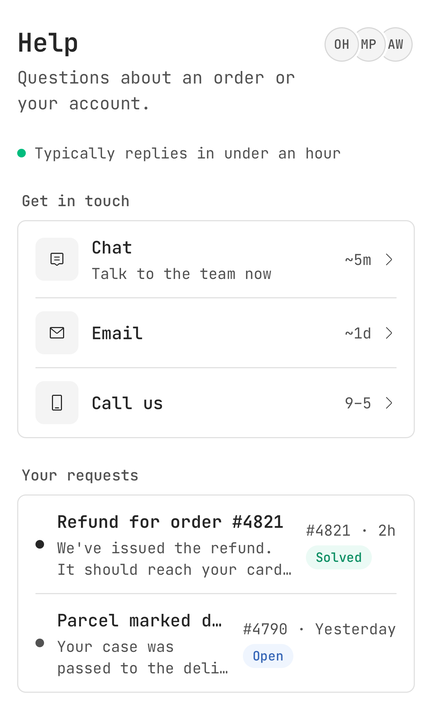
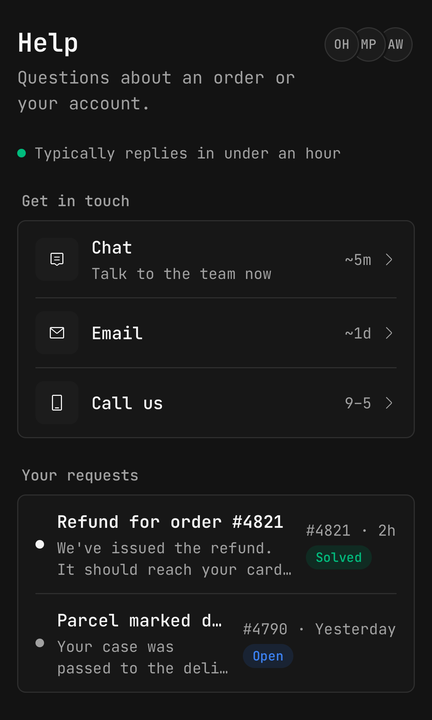
<Support.Channels title="Get in touch">
  <Support.Channel icon={<Icon icon={IconBubbleText} />} label="Chat" detail="~5m" onPress={openChat} />
  <Support.Channel icon={<Icon icon={IconPhone} />} label="Call us" description="Weekdays, 9am to 5pm" isDisabled />
</Support.Channels>
A shut channel stays on screen — dimmed, announced disabled, ignoring taps. A reader who knows the phone line exists and finds it gone assumes the app is broken.
Whether anyone is there
availability is set once, on the root, and Status, Agent and Note all read it. A screen that
is half "we are here" and half "we are not" is worse than either.
<Support availability="away">
  <Support.Status replyTime="Back at 9am tomorrow" />
  <Support.Status />
</Support>
Without replyTime the status falls back to the availability's own line — "We're away". A screen
reader hears the availability first — "Away. Back at 9am tomorrow" — because the dot is decorative
and colour must not carry it alone.
Routing to a queue
Support.Topics is a radio group: one request goes to one queue. Controlled or not, and pressing
the selected topic keeps it.
const [topic, setTopic] = useState<string | null>(null);

<Support.Topics title="What's it about?" value={topic} onValueChange={setTopic}>
  <Support.Topic value="billing" label="Billing" description="Invoices, refunds and plans" />
  <Support.Topic value="order" label="An order" description="Tracking, returns and damage" />
</Support.Topics>
<Button isDisabled={topic === null}>Continue</Button>
What happened to the last one
A Support.Conversation carries the ticket's status as a soft badge, and at most one dot:
unread — a reply nobody has read, in the accent — or updated — the thread moved with nothing new
to read, in grey. unread wins when both are set. The dots never speak; the row reads as one
sentence — "Refund for order #4821, solved, unread reply, 2h. We've issued the refund."
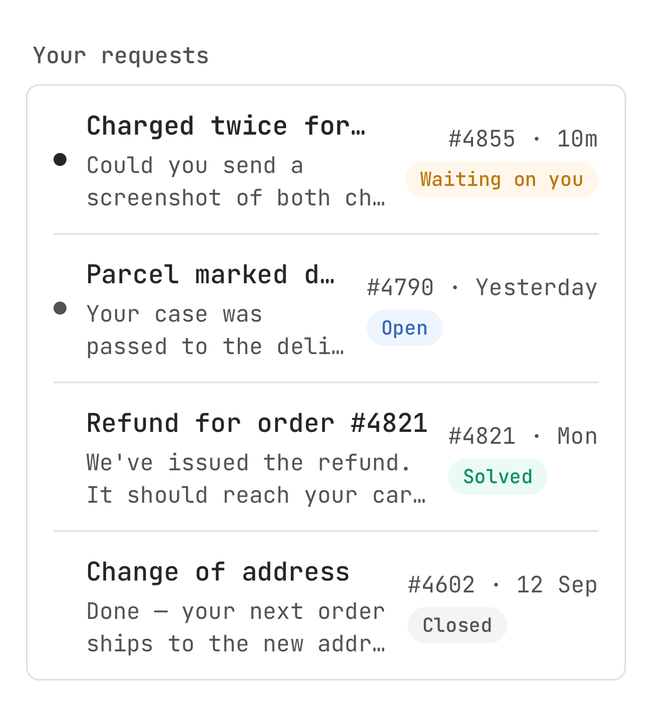
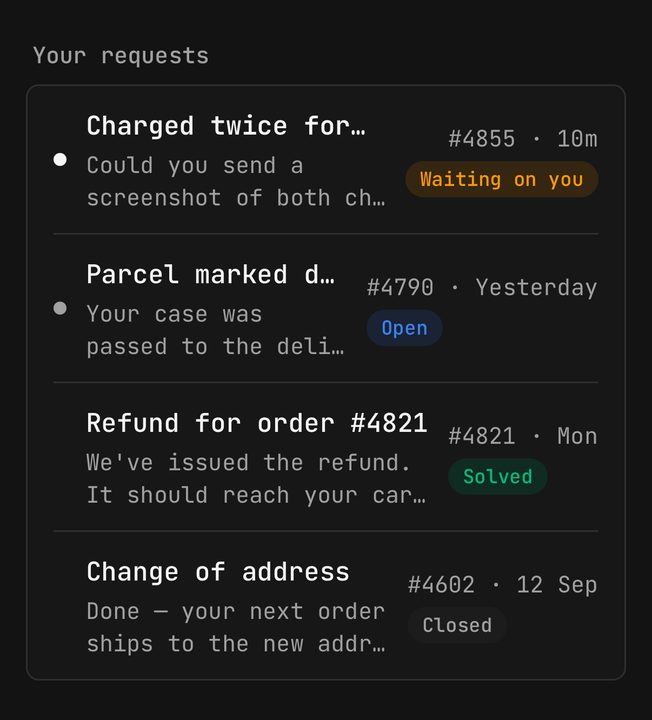
status | Badge | |
|---|---|---|
open | Open | info |
pending | Waiting on you | warning — the one that asks the reader to act |
solved | Solved | success |
closed | Closed | default |
The conversation itself
Support never renders the transcript or the composer. Those are your message list and your text field; Support is the furniture around them.
<Support.Agent name="Omar Haddad" title="Support" avatar={<Avatar name="Omar Haddad" />} typing={isTyping} />
<Support.Ticket title="Refund for order #4821" reference="#4821" status="open" />
<Transcript messages={messages} />
<Support.Replies>
  <Support.Reply label="Thanks" onPress={send} />
</Support.Replies>
<Support.Note>We'll reply by email if you leave.</Support.Note>
<Composer onSend={send} />
Transcript and Composer are yours.
While typing, the agent's status line gives way to three dots and "Omar is typing", announced
once. The dots hold still under Reduce Motion.
Agent and Note need no <Support> root. On a thread route without one, availability defaults
to offline — useSupport() never throws.
Handing off to a person
An escalates reply is the primary-soft chip, and adds the hint "Talk to a person". When the
thread changes hands, put a Support.Handoff between the two turns.
<Support.Reply escalates label="Talk to a person" onPress={escalate} />

<Support.Handoff>You were passed to Omar, who can see everything you told the assistant.</Support.Handoff>
A handoff is announced when it mounts. Pass announce={false} for one loaded as history, so opening
a thread does not read every past handoff.
Closing the thread
Support.Resolution holds the question; the control is yours — a Rating, or two buttons — and you
swap it for a thank-you once it is answered.
<Support.Resolution question="How did we do?">
  <Rating value={score} onChange={setScore}>
    <Rating.Stars accessibilityLabel="Rate this conversation" />
  </Rating>
</Support.Resolution>
Accessibility
Topicsis aradiogroupand eachTopicaradiowith its checked state.Statusis one polite live element, availability first.- A
Conversationspeaks everything its dots and badge draw. Agentannounces "is typing" once, not on every dot frame.Handoffreads on mount;Noteis plain text.- An escalating
Replyadds the hint "Talk to a person". Resolutionis a group labelled by its question; your control keeps its own role.
Notes
- Rows, not tiles. Channels, requests and articles are
Itemrows in aListGroupcard, so they match every other list in the app and read top to bottom on a narrow screen. Notesits above the composer, not in the transcript, because it is about the next message.- Keep the thread its own route. It scrolls differently from the landing screen and wants keyboard handling.
API Reference
Support
Prop
Type
Support.Header
Prop
Type
Support.Status
Prop
Type
Support.Channels, Support.Conversations, Support.Articles
Prop
Type
Support.Channel
Prop
Type
Support.Topics
Prop
Type
Support.Topic
Prop
Type
Support.Conversation
Prop
Type
Support.Article
Prop
Type
Support.Agent
Prop
Type
Support.Ticket
Prop
Type
Support.Handoff
Prop
Type
Support.Note
Prop
Type
Support.Replies
Prop
Type
Support.Reply
Prop
Type
Support.Resolution
Prop
Type
Hooks
Prop
Type