SearchBar
The query field at the top of a list — clear, Cancel, debounced change reporting and filter tokens.
Installation
SearchBar ships with the library — install it once, then import:
import { SearchBar } from "@delacour/react-native-ui/search-bar";Or copy the source into your project, to own and edit it:
bunx delacour@latest add search-barUsage
import { SearchBar } from "@/components/ui/search-bar";
import { useState } from "react";
import { View } from "react-native";

export default function Example() {
  const [query, setQuery] = useState("");

  return (
    <View className="flex-1 p-4">
      <SearchBar onValueChange={setQuery} value={query} />
    </View>
  );
}
Debounce and submit
onDebouncedChange fires debounce ms after the last keystroke, at once on the search key, and with "" at once on clear or Cancel.
<SearchBar
  debounce={300}
  onDebouncedChange={runSearch}
  onSubmit={runSearch}
  onValueChange={setQuery}
  value={query}
/>
Cancel modes
cancel is focus by default; always keeps the action on screen and never leaves the field the full width.
<SearchBar cancel="focus" />
<SearchBar cancel="always" cancelLabel="Done" />
<SearchBar cancel="never" />
Custom Cancel
Pass a SearchBar.Cancel as the child to change its label, variant or content; the bar still decides when it shows.
<SearchBar cancel="always">
  <SearchBar.Cancel variant="link">Close</SearchBar.Cancel>
</SearchBar>
Loading
isLoading swaps the clear button for a spinner and reports the field as busy.
<SearchBar isLoading={isSearching} onValueChange={setQuery} value={query} />Tokens
Active filters sit inside the box as chips; Backspace on an empty field removes the last one.
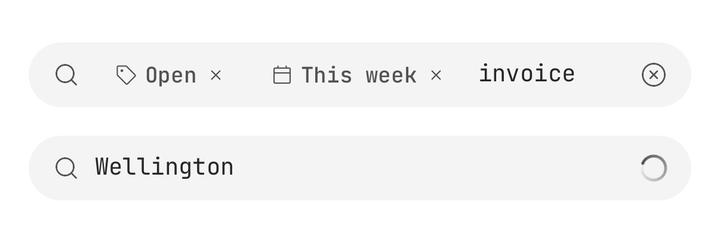
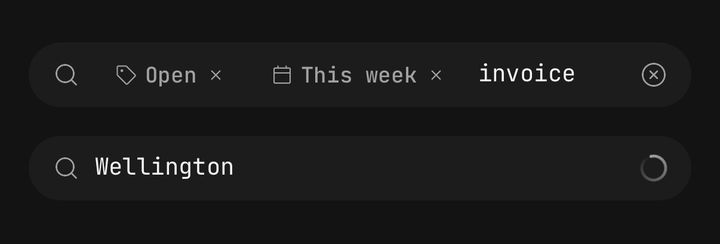
const [filters, setFilters] = useState([
  { id: "open", label: "Open", icon: IconTag },
  { id: "this-week", label: "This week" },
]);

<SearchBar
  onTokenRemove={(token) => setFilters((current) => current.filter((entry) => entry.id !== token.id))}
  tokens={filters}
/>;
Results on focus
onFocusChange is where a screen swaps its content for results — the bar is a field, not a results surface.
const [isSearching, setSearching] = useState(false);

<View className="flex-1">
  <SearchBar onFocusChange={setSearching} onValueChange={setQuery} value={query} />
  {isSearching ? <Results query={query} /> : <Browse />}
</View>;
Inside a list header
Render it as the list's header, and pin it with the list's own sticky header index.
<FlatList
  data={rows}
  keyboardShouldPersistTaps="handled"
  ListHeaderComponent={<SearchBar onValueChange={setQuery} value={query} />}
  renderItem={renderRow}
  stickyHeaderIndices={[0]}
/>
Inside a BottomSheet
Spread useBottomSheetInput() across inputRef, onFocus and onBlur, and the sheet lifts for the keyboard.
const sheetInput = useBottomSheetInput();

<SearchBar
  inputRef={sheetInput.ref}
  onBlur={sheetInput.onBlur}
  onFocus={sheetInput.onFocus}
  onValueChange={setQuery}
  value={query}
/>;
Sizes, shapes and variants
The box is Input's — three sizes and three variants — drawn as a pill or with the field's own corner.
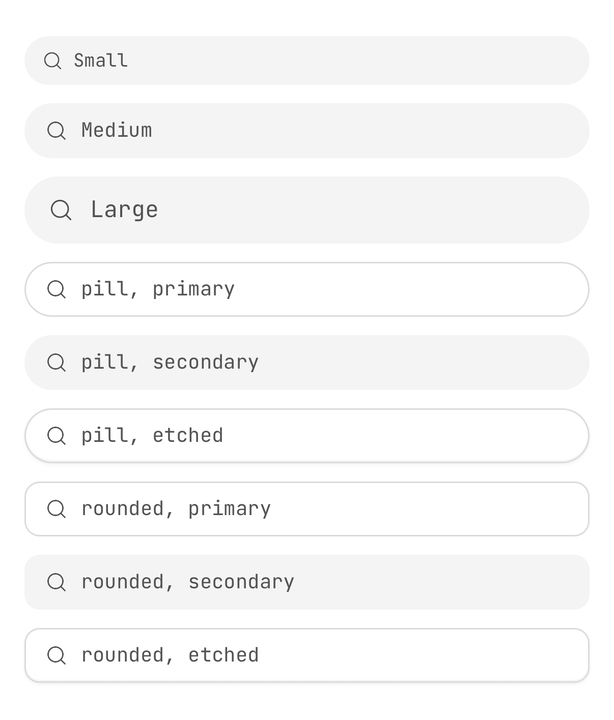
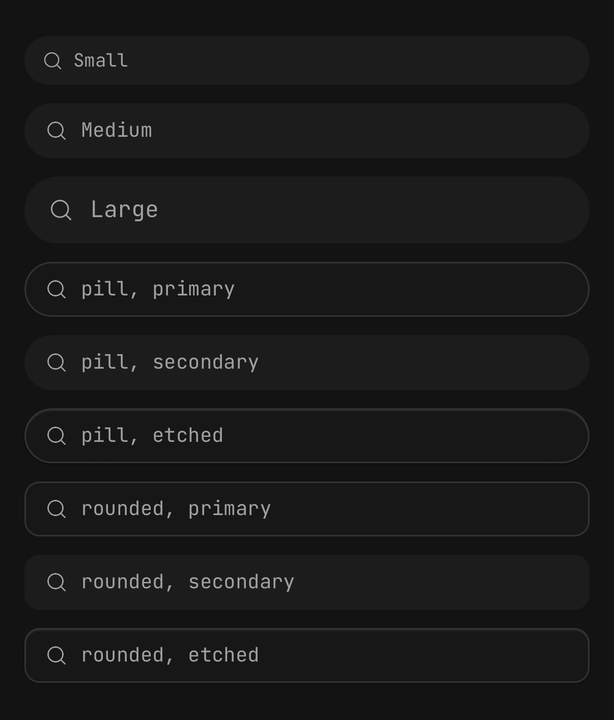
<SearchBar size="sm" />
<SearchBar size="lg" variant="primary" />
<SearchBar shape="rounded" />
Accessibility
The field has the search role and takes its name from an enclosing Field.Label, else the placeholder; clear and Cancel are labelled buttons, and a hidden Cancel is out of the accessibility tree.
<Field>
  <Field.Label>Search orders</Field.Label>
  <SearchBar clearAccessibilityLabel="Clear order search" />
</Field>
API Reference
SearchBarProps
Everything Input accepts is accepted and reaches the field, except multiline; className lands on
the row holding the field and Cancel.
Prop
Type
SearchBar.Cancel
A ghost Button at the field's size that cancels the search after its own onPress. Extends ButtonProps
except size.
Prop
Type
useSearchBar
Reads the enclosing bar's value, isFocused, isDisabled, isLoading, size and isCancelVisible,
and its clear() and cancel() actions, for a custom child. Throws outside a <SearchBar>.