DatePicker
A field that shows a date, a range or several, and opens a calendar in a bottom sheet to change them.
Installation
DatePicker ships with the library — install it once, then import:
import { DatePicker } from "@delacour/react-native-ui/date-picker";Or copy the source into your project, to own and edit it:
bunx delacour@latest add date-pickerMount the sheet provider
The picker opens a BottomSheet, so it installs
@delacour/react-native-bottom-sheet and its native peer react-native-teleport — rebuild the dev
client afterwards. Mount BottomSheetProvider once, inside DelacourProvider. This holds for
presentation="inline" too: the subpath imports the sheet either way.
Usage
import { type CalendarDate } from "@/components/ui/calendar";
import { DatePicker } from "@/components/ui/date-picker";
import { useState } from "react";
import { View } from "react-native";

export default function Example() {
  const [day, setDay] = useState<CalendarDate | null>(null);

  return (
    <View className="flex-1 justify-center p-4">
      <DatePicker value={day} onValueChange={setDay} />
    </View>
  );
}
The trigger is the same box as an Input, and its text is formatted
from the value — never stored beside it. Picking a day closes the sheet a beat later, so the
selection is seen. A value is a CalendarDate — { year, month, day }, no time zone — and every
helper for it comes from Calendar.
Range
const [stay, setStay] = useState<CalendarDateRange>({ start: null, end: null });

<DatePicker
  mode="range"
  minDate={today()}
  placeholder="Check in – check out"
  value={stay}
  onValueChange={setStay}
/>
The first tap is held inside the sheet — the trigger reads "12 Oct 2026 –" behind it — and the
sheet closes once both ends exist. onValueChange only ever sees a complete range, or an empty one
from Clear. Dismissing the sheet halfway keeps the last complete range.
A range within one month is written once — "5–9 Oct 2026" — where the platform's Intl supports
it.
Multiple
const [days, setDays] = useState<readonly CalendarDate[]>([]);

<DatePicker mode="multiple" value={days} onValueChange={setDays} />
Every toggle is reported, and the sheet stays open until Done. The trigger lists two days, then counts: "3 dates".
Min, max and disabled days
<DatePicker
  minDate={today()}
  maxDate={{ year: 2026, month: 11, day: 30 }}
  disabledDates={[{ type: "weekday", days: [0, 6] }]}
/>
disabledDates takes the calendar's matchers — a date, a span, weekdays or a predicate. A range
that would cross a disabled day starts again from the tapped day rather than completing.
Custom format and locale
<DatePicker locale="de-DE" />
<DatePicker format={(d) => serialiseDate(d)} />
<DatePicker
  mode="range"
  formatRange={({ start, end }) => (start && end ? `${start.day}–${end.day}` : "Pick the dates")}
/>
locale names the months on the trigger and in the calendar and sets the first day of the week.
format replaces the day formatter everywhere — a single date, each of several, each end of a range.
formatRange replaces a whole range.
In a field
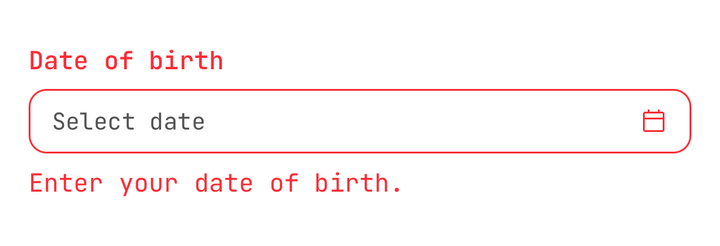
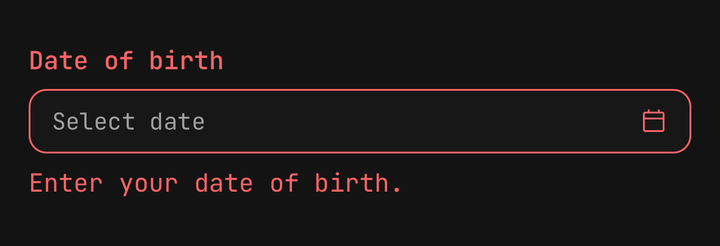
<Field isInvalid={day === null}>
  <Field.Label>Date of birth</Field.Label>
  <DatePicker maxDate={today()} value={day} onValueChange={setDay} />
  <Field.Error>Enter your date of birth.</Field.Error>
</Field>
Inside a Field the trigger takes isInvalid and isDisabled
with nothing said at the call site, names itself from Field.Label, and a tap on the label opens
the sheet. An explicit prop on the picker still wins.
Controlled open
const [isOpen, setOpen] = useState(false);

<DatePicker isOpen={isOpen} onOpenChange={setOpen} value={day} onValueChange={setDay} />
<Button onPress={() => setOpen(true)}>Pick a date</Button>
isReadOnly shows the value and never opens; isDisabled fades it as well.
Inline
<DatePicker presentation="inline" value={day} onValueChange={setDay} />Draws the calendar on a card in place, with no trigger and no sheet. presentation is a union so an
anchored popover can join it later without a breaking change.
Sizes and variants
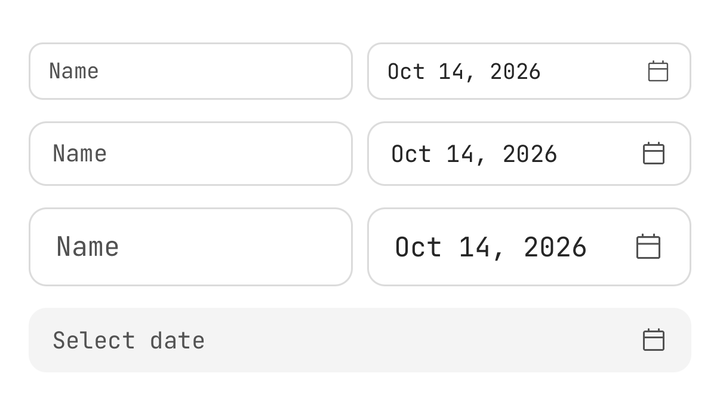
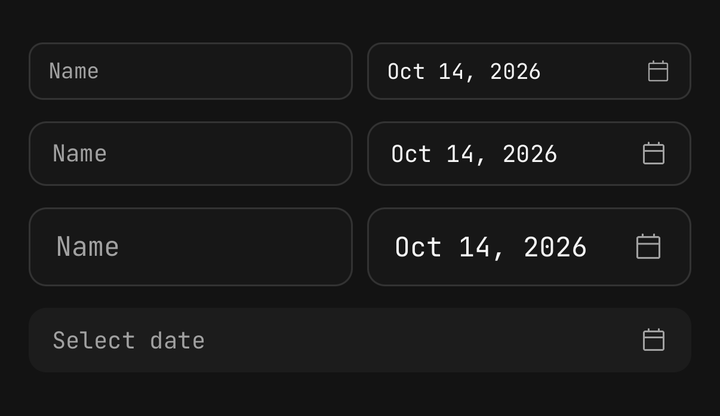
<DatePicker size="sm" />
<DatePicker size="lg" variant="secondary" />
size and variant are the Input axes, read from the same slot, so a picker beside a text field
lines up with it exactly. The calendar inside keeps its own calendarSize (default md), so a
small field never shrinks the day targets.
Composition
<DatePicker mode="range" value={stay} onValueChange={setStay}>
  <DatePicker.Trigger>
    <DatePicker.Value />
    <DatePicker.Icon />
  </DatePicker.Trigger>
  <DatePicker.Content title="Your stay" />
</DatePicker>
DatePicker.Content takes children to replace the sheet's body — DatePicker.Calendar,
DatePicker.Clear and DatePicker.Done are the parts it is built from.
Accessibility
- The trigger is a button named by
accessibilityLabel, else the field's label, else "Date". Its value is read in full — "5 October 2026 to 9 October 2026", "not set" — with the hint "Opens calendar", and it reports itself expanded while the sheet is up. - When the sheet closes on a finished pick, "Selected …" is announced.
- The sheet is labelled by its title. The calendar inside reads every day by its full date.
API Reference
Anatomy
| Part | What it is |
|---|---|
DatePicker | Owns the value, the open state and the half-picked range |
DatePicker.Trigger | The Input-shaped button that opens the sheet |
DatePicker.Value | The formatted selection, or the placeholder |
DatePicker.Icon | The calendar glyph — muted, destructive while invalid |
DatePicker.Content | The sheet — scrim, close, title, calendar, footer. Inline, the calendar in place |
DatePicker.Calendar | The Calendar, bound to the picker |
DatePicker.Clear | Empties the selection and keeps the sheet open |
DatePicker.Done | Closes the sheet |
DatePicker
Prop
Type
DatePicker.Content
Prop
Type
useDatePicker
Reads the enclosing picker from a custom part: mode, value, shown (the value, or the range
being picked), display, isOpen, open, close, clear, hasValue, isDisabled,
isInvalid, isReadOnly and locale. useDatePickerContext() returns null outside a picker
instead of throwing.